
All of your draft and submitted applications are available in the Applications section of the FedNor Portal. In this section, you may:
- Review, edit, submit, and withdraw draft applications
- View submitted applications and confirmations of submissions
- Upload, download, and view supporting documentation
To access these functions from the My FedNor Portal homepage, click on the “Applications” link located on the left navigation panel and then select “Manage my applications”.

On the Manage my applications page, your organization will automatically pre-populate the ‘select organization’ box, or you may choose your registered organization from the drop-down list. Once you select your organization, the page will populate with a list applications for that organization, including any draft or withdrawn applications. Initial applications and detailed applications will appear as two separate entries for each application.
Example of a draft Initial application.
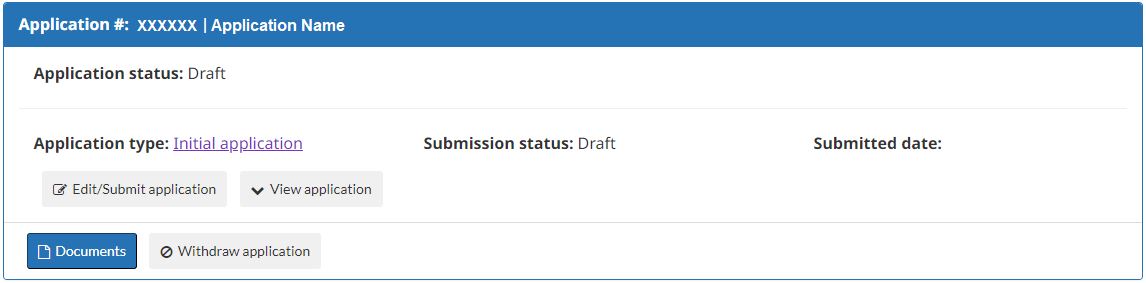
Example of an application with a completed Initial application and Detailed application.

Instructions on how to interact with each entry are provided in the blue Information box located at the top of the page.
Document management
On the Manage my applications page, under a draft or submitted application, you can select the “Documents” button to upload additional documents to support your funding application. You can also review and download documents that were uploaded as part of the application.

Following the submission of your application, additional documents should only be uploaded at your FedNor Officer’s request or after discussion with your FedNor Officer.
Instructions on how to upload documents are provided in the blue Information box on the Document management page. Use the “Add New Row” button to add more fields as needed to upload all supporting documents.
- Document type: Using the drop-down list, identify the types of documents provided to support your application.
- Description: For each upload, provide a brief description of the document.
When uploads are complete, select the “Submit” button to submit the document(s) to FedNor. Once an uploaded document is submitted, it cannot be deleted.