
The Initial application for funding is available on the FedNor Portal.
The following information serves as a guide to support the completion of your application.
- Navigating the application
- Organization
- Profile
- Contact
- Project
- Costs and funding
- Attachments
- Review
- Certification
- Confirmation
Please contact a FedNor officer to discuss your project prior to submitting an application.
Navigating the application
Once you start the application process, an application and reference number is automatically generated. If you exit the application form, a draft will be saved and can be retrieved at any time from the FedNor Portal landing page by selecting "Applications" and then "Manage my applications" in the left-hand navigation panel.
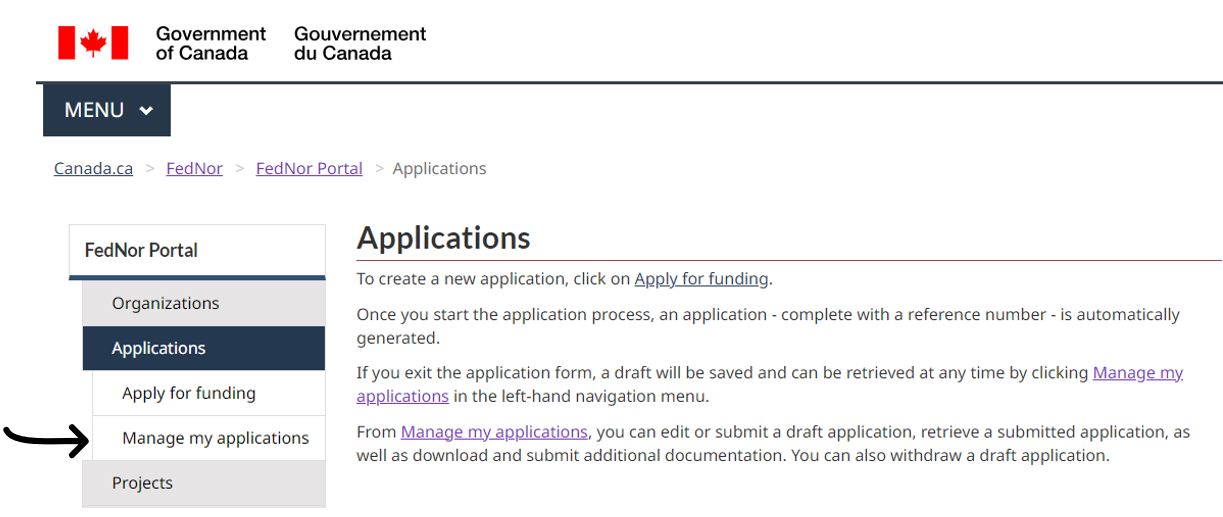
From "Manage my applications", you can edit or submit a draft application, retrieve a submitted application, or download and submit additional documentation. You can also withdraw a draft application.
There is a progress bar at the top of each page of the application. You can use this tool to navigate to a section of the application and to gauge your progress working through the stages of the application process.

At the bottom of each page of the application, there are navigation buttons: "Save", "Previous", and "Next". You can use these to move between application pages and to save your work prior to exiting. Using the "Next" button will also save your work. The "Withdraw application" button will withdraw a draft application from the system. The "Print" button will allow you to print the current application page.
Throughout the application, note that any field indicated with an asterisk (*) is a mandatory field and must be completed to submit your application.
Organization
On this page, you are presented with your registered organization's legal name, business number, business type, and business and mailing addresses. If the information presented is not correct, select "No" under the confirmation message. The organization information can then be updated by following the link in the blue Information box. Update the organization information, and select "Submit".
After selecting "Submit", you will be redirected to a new page confirming the successful update. On this page, select "Exit". This will return you to the My organizations page. Return to the draft application by selecting "Applications", then "Manage my applications" from the left-hand navigation panel.
Once the information is verified on the organization are confirmed, select "Yes" using the Yes/No indicator, then select "Next".
Note: Organization details can only be updated by a portal administrator. If you receive an error, please advise the portal administrator at your organization of the requirement to update organization details.
Profile

On this page, you are asked to complete (for first-time applicants) or review and update (for returning applicants) profile information about your organization. Once this information is entered/updated, it will carry forward, saving you time and effort on future applications.
Repeat applicants are strongly encouraged to closely review and update this information to ensure an accurate submission. This information will be used to help assess eligibility.
-
*Total number of employees: Enter the sum of the total number of full-time and part-time employees identified.
For assistance in determining the difference between an employee and an independent/self-employed contractor, see the Canada Revenue Agency's Employee or Self-Employed? guide and Employment and Social Development Canada's Determining the Employer/Employee Relationship guide.
- *Total number of full-time employees: Enter the number of full-time employees at your organization. Statistics Canada defines full-time employees as those who work 30 hours or more in a regular work week.
- *Total number of part-time and seasonal employees: Enter the number of part-time employees at your organization. Statistics Canada defines part-time employees as those who work less than 30 hours in a regular work week. Include any seasonal employees in this field.
Information on Questions Regarding Equity-Deserving Groups
Statement of Use
Understanding that participation of equity-deserving groups is a first step on the path to building strong and inclusive communities, FedNor will be collecting data on applicants and organizations that belong to equity-deserving groups to strengthen its approach to equity, diversity, and inclusivity.
The information will not be used to assess or score applications. It will be confidential and no identifiable information will be disclosed. The data gathered will be used to uncover service gaps and enhance program design and tools.
Information provided to FedNor will be treated in accordance with the Access to Information Act and the Privacy Act. These laws govern the use, protection and disclosure of personal, financial and technical information by federal government departments and agencies. Information provided to FedNor is secured from unauthorized access.
FedNor understands that providing information on identity is sensitive. Providing information is voluntary. Please select all categories that apply. If you do not wish to self-identify, please leave the responses blank.
This question applies to for-profit organizations only.
Please indicate if your organization is majority-owned by one or more of the following equity-deserving groups.
'Majority-owned' means majority ownership of more than 50 percent for two or more years by an individual who identifies as at least one of the equity-deserving groups in the following bulleted list. For new businesses (i.e., in existence for two years or less), 'majority-owned' means majority ownership of more than 50 percent by an individual who identifies as one of the equity-deserving group(s) since it was established.
This question applies to not-for-profit organizations only.
Please indicate if your organization is majority-led by one or more of the following equity-deserving groups.
'Majority-led' means that the majority (51 percent or more) of primary decision maker(s) belongs to or identifies as at least one of the equity-deserving groups in the following bulleted list. Decision makers could include members of the Board of Directors or management positions, such as the Executive Director.
Equity-deserving groups:
- 2SLGBTQI+: Includes persons who identify as belonging to the following communities: Two-Spirit; Lesbian; Gay; Bisexual; Transgender; Queer; Intersex; and/or a person who identifies as part of sexual and gender diverse communities who use additional terminologies.
- Francophone: Includes persons who identify as Francophone, the Official Language Minority Community in Northern Ontario.
- Indigenous Peoples – First Nations; Métis; Inuit: Includes persons who identify with the Indigenous Peoples of Canada. This includes those who identify as First Nations (North American Indian), Métis, and/or Inuit.
- Newcomers to Canada and immigrants: Includes persons who identify as being newcomers to Canada or immigrants. This includes persons who are, or have been, landed immigrants or permanent residents, who have been granted the right to reside in Canada permanently by immigration authorities. Immigrants who have obtained Canadian citizenship through naturalization are included in this group. Newcomers are considered recent landed immigrants who arrived in Canada within the last five years.
- Persons with disabilities: Includes persons who identify as having a long-term or recurring physical, mental, sensory, psychiatric, or learning impairment and a) consider themselves to be disadvantaged in employment by reason of that impairment, or b) believe that an employer or potential employer is likely to consider them to be disadvantaged in employment by reason of that impairment. This also includes persons whose functional limitations owing to their impairment may have been accommodated in situations of employment.
- Racialized communities: Includes persons, other than Indigenous peoples, who identify as being non-Caucasian in race or non-white in colour (e.g., South Asian, Chinese, Filipino, Latin American, Arab, Southeast Asian, West Asian, Korean, Japanese). Racialized groups are those that have been socially constructed as races (based on characteristics such as ethnicity, language, economics, religion, culture, politics). These can include: North American origins; European origins; Caribbean origins; Latin, Central, and South American origins; African origins; Asian origins; Oceanian origins; and/or other ethnic and cultural origins. Note: for the purposes of internal tagging, 'racialized communities' does not include Black Canadians as these groups have independent tags.
- Racialized communities – Black communities: Includes persons who identify as being members of the Black community.
- Women: Includes persons who identify with the female gender.
- Youth and young adults: Includes persons being between the ages of 15 and 30.
- *Please indicate in which official language(s) your organization provides services to and/or communicates with the public: Select the language(s) that apply – English, French, or both.
- *Provide a brief description of your organization, or, review and update the existing description, if applicable. Include details on the mandate, ownership/governance, products/services and key activities (max. of 1,000 characters). Provide a description of your organization that is sufficient for someone unfamiliar with your organization to understand what you do and how you operate.
- *Provide a brief history or your organization, or, review and update the existing history, if applicable. Include any relevant historical events such as any changes in ownership, a reorganization, or critical events related to financial, governance and/or administrative capacity (max. 1,000 characters). Identify when your organization was founded and any milestones that have occurred since that time.
Contact

On this page, identify and provide contact information for the person(s) who will be the main point of contact regarding the project. Choose the appropriate person(s) from the drop-down list and select "Add Contact" to add the person to the Primary contact table; or enter a person's information directly into the table. To add multiple contacts, select "Add New Row".

If the primary contact(s) is not a signing officer of the organization, confirmation of that person's right to represent the organization may be required.

Project

Project
- *Project title (max. 250 characters): Provide a brief, descriptive name for your project for ease of reference.
Primary location of the project
- *Address fields: Identify the primary location where the project is physically taking place.
- If the project activities occur in multiple locations, identify the region or geographic area (max. 250 characters). Name the communities or describe the region the project activities would occur in; or if activities will only take occur in one location, leave this field blank.
Project information
*Provide a description of the project and key activities (max. 2,000 characters). Describe what project activities would take place, what steps would be involved in carrying out the project, what resources would be required, what the goal of the project would be, and who would be responsible for the project. This information is used to assess project eligibility and alignment with funding priorities, so be as detailed and specific as possible. Assume that the reader has no knowledge of your project, even if you have discussed the project with a FedNor Officer.
NOTE: If this application is requesting assistance under the Regional Artificial Intelligence Initiative (RAII), please include details on how the project aligns with the program objectives and if/and how it involves the productization/commercialization and/or the adoption/adaption of artificial intelligence (AI). Include the AI type and fields used in your project, such as machine learning, deep learning, computer vision, natural language processing, predictive AI, generative AI, etc.
- *Estimated project start date (yyyy-mm-dd): Identify the first day you anticipate incurring significant expenses for your project. If the project would not move forward without FedNor support, it is recommended that you select a date at least four months into the future to allow time for completion of the Detailed Application (if applicable), due diligence, and decision-making in line with FedNor's service standards.
- *Estimated project end date (yyyy-mm-dd): Identify the last day you anticipate incurring expenses for your project.
-
*Describe the economic benefits associated with this project (max. 1,000 characters). Describe the qualitative and quantitative outcomes/impacts/benefits of the project. Outcomes can be described using words (e.g., "enhanced", "improved") or using metrics (e.g., "number of outcomes"). This information is used to assess project eligibility and alignment with funding priorities, so be as detailed and specific as possible. Consider both the direct outcomes of the project activities and the benefits delivered by undertaking the project as a whole. Specify if benefits will be direct or indirect, immediate (i.e., upon completion of the project) or medium- or long-term.
Examples of economic benefits depend on the type of project but could include: number of events hosted; number of event participants; number of studies completed; number of businesses benefiting from the project; the commercialization of new innovative products; increased capacity in a community or organization; communities with improved economic development infrastructure or planning; or increased sales or spending in the project region.
-
Number of jobs created (full-time equivalents): Complete the table to the best of your knowledge in order to calculate the full-time equivalent (FTE) of the job(s) created. Use the "Add New Row" button to add more fields as needed.

-
A job created refers to a job that did not exist within the applicant organization prior to the project, but that was created as a direct result of the project activities. Do not count any position as both created and maintained. Do not include any positions employed by suppliers or contracted services such as consultants, engineers, IT firms, etc. However, labour on construction projects, such as skilled labourers and construction workers, should be included whether directly employed or employed through a third party.
To complete the table:
- Job title/role: Identify the job that is expected to be created (e.g., Economic Development Officer, Labourer, Project Coordinator). Use additional rows to identify additional job titles.
- Number of positions: Identify how many individuals are expected to be hired for each role (e.g., a project may create one Economic Development Officer position, five Labourer positions, two Project Coordinator positions).
- Anticipated number of hours worked per week: Identify how many hours per week persons in the position(s) would work directly on project activities.
- Anticipated number of weeks worked during the project: Identify how many weeks a person in the position(s) is expected to work between the project start and end dates.
-
Number of jobs maintained (full-time equivalents): Complete the table to the best of your knowledge to calculate the full-time equivalent (FTE) of the job(s) maintained. Use the "Add New Row" button to add more fields as needed.

A job maintained refers to a job that existed within the applicant organization prior to the project but that would not continue, or would likely be lost, if the project is not funded. For example, an employee at your organization that would still continue to work regardless of the project should not be counted. Jobs maintained must be a direct result of the project activities. Do not count any position as both created and maintained. Do not include any positions employed by suppliers or contracted services such as consultants, engineers, IT firms, etc.
To complete the table:
- Job title/role: Identify the job that is expected to be maintained (e.g., Economic Development Officer, Labourer, Project Coordinator). Use additional rows to identify additional job titles.
- Number of positions: Identify how many individuals are expected to be maintained in each role (e.g., a project may maintain one Economic Development Officer position, five Labourer positions, two Project Coordinator positions).
- Anticipated number of hours worked per week: Identify how many hours per week persons in the position(s) would work directly on project activities.
- Anticipated number of weeks worked during the project: Identify how many weeks persons in the position(s) would work between the project start and end dates.
Costs and funding

Note that a project's total project costs must equal its total project funding.
Project costs
-
Cost description: Briefly describe the types of costs that comprise the project. Use the "Add New Row" button to add more fields as needed to demonstrate the full scope of costs required. Costs must be incremental and directly related to the project. 'Incremental' means that your organization would not normally incur these costs as part of its operations but would incur them as a result of the project.

Examples of cost descriptions include salaries and benefits, consulting fees, leasehold improvements, equipment, etc. Costs could include cash costs or in-kind costs. An 'in-kind' cost is one that does not require a cash transaction for the applicant, such as donated materials or the staff time of a partner organization.
- Cost amount: For each type of cost identified, specify the budgeted amount. When calculating your budget, consider that any refundable portion of HST for your organization is ineligible for support and should not be included in your project budget. Any in-kind costs must be valuated fairly. The total cost should represent the total amount required to carry out the project.
- Will project costs (or legal commitments) be incurred prior to the project approval? If yes, provide details below. Using the No/Yes indicators, identify whether any project costs will be incurred, or legal commitments made (e.g., contracts awarded, purchase orders placed), prior to the project approval (generally estimated four months into the future).
- If yes, provide details of the incurred or planned costs or legal commitments (max. 250 characters). If you will be incurring project costs or legal commitments, describe the nature and amount of costs incurred or for which legal commitments have been made, and explain why it is necessary to make this commitment prior to project approval.
Project funding sources
-
Funding source: Identify the sources of funding for the project. Use the "Add New Row" button to add more fields as needed to demonstrate all sources of project funding.

- FedNor: Identify the amount of financial support requested from FedNor.
- Other: Using the drop-down list, identify the source(s) of the balance of project financing. Drop-down list options:
- Applicant/Client: Use this option to identify your organization's contribution to the project. Under most FedNor programs, the applicant contribution is normally a minimum of 10 percent of project costs for not-for-profit applicants and normally a minimum of 50 percent of project costs for for-profit applicants. If your organization identifies as one of the organizations on the drop-down list (e.g., municipality, Indigenous government), you must still use the "Applicant/Client" line to demonstrate the applicant's contribution.
- Federal government: Use this option to identify other sources of federal funding for the project, such as Indigenous Services Canada (ISC). Do not include the request to FedNor on this line.
- Provincial government: Use this option to identify sources of provincial funding for the project, such as the Northern Ontario Heritage Fund Corporation (NOHFC), whether repayable or non-repayable.
- Municipality and community economic development: Use this option to identify sources of municipal or municipally-owned economic development corporation funding for the project.
- Indigenous organization: Use this option to identify sources of Indigenous government project funding, such as funds contributed by a band or tribal council.
- Financial institution: Use this option to identify sources of financial institution project funding, such as a loan or line of credit from a bank, the Business Development Bank of Canada (BDC), or a Community Futures Development Corporation (CFDC).
- Other: Use this option to identify other sources of project funding that do not align with the other options on the list, such as funds from project partners, private foundations, not-for-profit grants, tax credits, venture capital funding, or related-party loans.
- Funding source details: For each of the Other (i.e., non-FedNor) funding sources, describe the nature of the funding. Identify if it is: repayable or non-repayable; cash, credit, or in-kind; allocated solely to certain project costs; etc.
- Amount ($): Identify the dollar amount of funding per funding source.
- Confirmed: Using the Yes/No indicators, identify whether the funding is already approved or if it is pending approval.
Note that the project costs must equal project funding sources.
Attachments

On this page, you have the option to upload documents to support your funding application.
Instructions on how to upload documents are provided in the blue Information box on the Attachments page. Use the "Add New Row" button to add more fields as needed to upload all supporting documents.
- Document type: Using the drop-down list, identify the types of documents provided to support your application.
- Description: For each upload, provide a brief description of the document.
Any required attachments are identified with a pre-populated entry in the table's "Document type" field. If the "Document type" is blank, then no attachments are required. Some templates are available to support these requirements; ensure to review the template section for options.
Review

On this page, you will be presented with all the application information provided and given the opportunity to review prior to submission. If there are any validation errors, such as mandatory fields that were left blank, these will be identified in a red error box at the top of the page. Return to the appropriate page using the progress bar at the top of the page and update your information to move forward with your application.
Once you have reviewed and verified that the application is complete, select the "Confirmation" checkbox at the bottom of the page, then select "Next".

Certification

Read the certification section carefully to ensure that you are able to acknowledge and certify all of the statements on behalf of the applicant organization. Once you have fully reviewed the certification, select the three checkboxes stating that you:
- Acknowledge having read, understood, and agree with the above declaration;
- Certify that FedNor funding is required for the project to proceed, and;
- Agree that FedNor may make the enquiries it deems necessary to evaluate the application.
Once you have reviewed and checked the boxes, select the "Submit" button at the bottom of the page.
Confirmation
If your application was successfully submitted, you will be presented with a Confirmation page and an Application number. Select "Portal main menu" or "Print". Do note that the confirmation will be available under the "Manage my projects" section of the portal.

It is strongly recommended that you include your application number in all correspondence with FedNor staff.